
How to Detect GPS Tracking on Your Car: UK Guide

You park somewhere you haven't told anyone about, and later someone mentions that exact street. Or they turn up shortly after you arrive, again, and call it a coincidence. If you're trying to detect GPS tracking, don't start by ripping trim off your car. Start by working out which technology could be giving away your location, because a phone that finds no Bluetooth tag hasn't cleared a cellular tracker, and a clean visual check hasn't cleared a sleeping battery unit.
Phone and Account Signs of Location Tracking
You check Find My, see nobody new, and close the phone satisfied. Meanwhile the car's connected app still lists an old account with live location switched on, or a fleet dashboard tied to the registration is still visible to someone who should have been removed. Phone and account checks are worth doing first because they are fast and safe. They also have a limit: they show who can see location through software and accounts, not whether a standalone tracker is attached to the vehicle. I would treat a clean phone as one line of enquiry closed, not the whole case.
Start with the account check you can finish from a safe device. In Google Maps and Apple's Find My, review who you share location with and remove anyone you don't recognise or no longer trust. In Apple and Google account settings, check the list of signed-in devices, then shared calendars, shared photo albums and any unfamiliar app with location permission.
Check the Car's Own Accounts
Your vehicle may report its position without extra hardware. Open the manufacturer connected-car app and confirm who can see the vehicle, its trips and live position. Check insurance telematics apps and any fleet dashboard linked to the registration, especially if the car is leased, financed or supplied through work.
Behaviour matters alongside settings. Someone repeatedly knowing where you have been, describing routes, or naming places you have not told them about is a pattern worth recording. If that happens while you suspect geolocation software or a vehicle tracker, log each instance and report it to the police.
Practical rule: A sign tells you to look properly. It doesn't tell you who installed a device, or prove that one exists.
Start a dated incident log now, even before you inspect the car. For each entry, record the date, time, place, what was said or seen, and the source. Keep screenshots with original files where possible, and note who had access to the car before each incident, including garages, valets and anyone who borrowed it.
Those records matter because tracker misuse is being reported more often. In the UK, GPS trackers were reported in 217 coercive-control and stalking cases in 2023, up 317% from 52 cases in 2018, according to ITV News reporting Freedom of Information responses from 14 police forces. Keep the log factual. Dates, screenshots and exact wording help police, a solicitor or an investigator more than an early guess about who did it.
Where GPS Trackers Hide on a Vehicle
A covert unit needs two things, a satellite and cellular signal, and a fitting point the installer can reach quickly. That's why I would start with the OBD port and the outside of the car. A plug-in device in the diagnostic port takes seconds to fit, while a magnetic box in a wheel arch needs no tools at all.
Work in a fixed order so you don't check the same place twice and miss another entirely. Look for a black or grey box with no badge, fresh electrical tape, new cable ties, loose trim, disturbed dust, or wiring that doesn't sit with the original loom. In the engine bay, check around the battery and fuse box for added wiring that serves no obvious purpose.
Location | What to look for | How to check |
|---|---|---|
Wheel arches and underbody | Magnetic box with no badge, fresh tape or cable ties | Torch and inspection mirror |
OBD port under the dashboard | Plug-in device or unfamiliar adaptor | Visual check and gentle pull |
Behind door cards and dashboard trim | Wiring that does not match the fuse layout | Trim tool, removed slowly |
Under seats and boot liner | Small sealed battery pack | Hand check and torch |
Behind number plate and bumpers | Loose casing or new screws | Torch and gloved hand |
Towing hitch and rear chassis | Box held by magnets or strapping | Torch and mirror |
Use a plastic trim tool, not a screwdriver, if you need to ease a panel back, and stop if clips resist. Run a gloved hand along seat frames, inside the spare wheel well and behind bumper edges where your eyes can't reach. Legitimate fleet systems do exist, and the Faberwork fleet geofencing case study shows how openly managed vehicle location supports normal fleet work, which is different from a hidden unit nobody can explain.
If you find something unfamiliar, photograph it in place before touching it, with a wider shot showing where it sits and a close shot of any label or wiring. Record the date and time in your log. Our overview of the UK legal limits on GPS tracking is worth reading before you remove anything, because ownership and consent affect what you should do next.
Which Detection Method Catches Which Tracker
Most false reassurance comes from using one test and treating it as every test. A phone alert looks for nearby Bluetooth items such as AirTags. It won't reveal a cellular GPS unit in a bumper because that unit reports through a mobile network and may not broadcast Bluetooth at all.
A handheld RF detector listens for active transmissions, so it can point you toward a transmitting cellular device. It can miss the same device between reports, when the battery is flat, or while the car is parked and the unit is asleep. A visual inspection confirms hardware you can reach, but it won't clear a small battery pack deep inside trim or wiring spliced neatly into the loom.
Method | Detects | Misses | Best for |
|---|---|---|---|
Phone Bluetooth alert | Nearby Bluetooth tags such as AirTags | Cellular GPS units with no Bluetooth tag | Quick first check |
Handheld RF detector | Active radio transmissions | Units that sleep between reports | Repeat scans and comparison |
Visual inspection | Hard-wired or loosely fitted hardware | Units deep inside trim or wiring | Confirming a found object |
Professional TSCM sweep | Wide range of transmitters and hard-wired devices | Anything not reachable within the inspection | Vehicles, homes and offices where the stakes are high |
The scale of the problem explains why one negative check isn't enough. In England and Wales, police-recorded stalking reports involving AirTags and GPS trackers rose from 57 in 2018 to 568 by the end of 2024, an increase of 896%, according to figures obtained through Freedom of Information requests and reported by The Independent.
False alarms cut the other way too. Your phone, dashcam, alarm, key fob, tyre-pressure sensors and the car's own telematics can all produce signals or hardware that look suspicious in isolation. Check the UK laws on RF detector use and compare every hit against devices you know are fitted before you call it a tracker.
A clean result from one method means that method found nothing. It doesn't mean the vehicle is clean.
How to Run a Full Vehicle Sweep
The infographic below summarises the order of the sweep before the detailed steps.
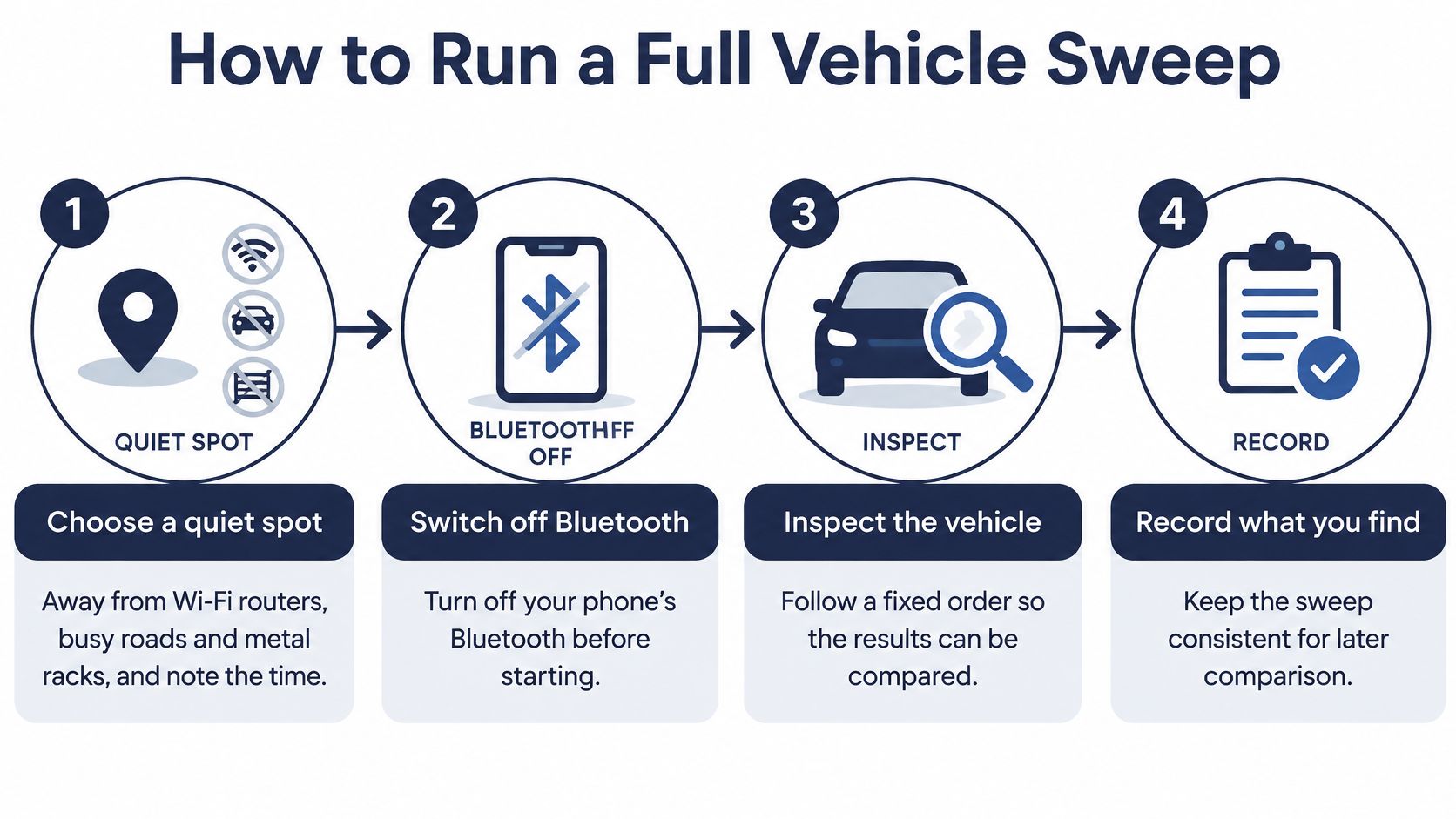
Run the sweep in the same order each time, so results from different scans can be compared fairly. Changing the location, the car's power state and your route around the vehicle all at once leaves you with readings you can't interpret.
The eight steps
Choose a quiet spot: Park away from Wi-Fi routers, busy roads and metal storage racks, then note the time and place. Background signals make weak or intermittent hits harder to judge.
Silence your own kit: Switch off your phone's Bluetooth and Wi-Fi, or leave the phone, smartwatch and earbuds away from the car. Your own radios are the commonest cause of false hits near the cabin.
Walk the vehicle first: With the bonnet and boot open and the car well lit, inspect the wheel arches, underbody, OBD port, seats, boot liner, plates, bumpers and hitch. Photograph anything unfamiliar before the electronic scan begins.
Scan in three power states: Scan with the ignition off, then with the ignition on and accessories running, then with the engine running. Some hard-wired units only wake when the car draws power, while others transmit as soon as a door opens.
Hold steady in each zone: Keep the detector still for five to ten seconds in each area and move slowly across the floor, arches and boot. Sweeping too quickly turns a short burst into a miss.
Repeat after 20 to 30 minutes: Carry out the full scan again after a short interval and, where it's safe, after a brief drive. Cellular trackers often transmit in bursts, and motion can wake a unit that stayed silent while parked.
Compare against known devices: Check every reading against the dashcam, alarm, tyre-pressure system, satellite navigation and any manufacturer, insurer or fleet unit. Switch known devices off one at a time where you can, then scan again.
Log every reading: Record the time, zone, power state and signal strength, and keep photographs with the notes. A reading you can't place later is a reading you'll have to repeat.
What the results mean
A clean result means no unexplained signal across all three power states and both scans, and no unfamiliar hardware on the physical walk-round. That is good evidence, but it still isn't absolute proof, because a flat or well-hidden unit can stay silent.
A suspicious result is a signal that repeats in the same zone, rises as you move toward one panel or component, and matches no known device in the car. Don't chase a single spike. Note it, return to that zone on the repeat scan, and confirm it with a torch and your hands before drawing any conclusion.
Legal Lines and Evidence to Keep
Finding a box doesn't settle whether it's lawful. Under the framework set out in the UK government's covert surveillance and property interference code of practice, a device that only provides information about a vehicle's location is treated differently from covert monitoring of conversations or activity inside the vehicle. Location tracking can still raise privacy and data-protection concerns depending on ownership, consent, purpose and who is being monitored.
Work vehicles sit in a different position from private cars. The Information Commissioner's Office states in its guidance on monitoring workers that telematics data is personal information, workers and passengers must be informed, and monitoring a work vehicle during private use will rarely be justifiable. So the device in front of you could be a lawful fleet unit, a tachograph component, a finance tracker or a covert device fitted without authority.
Device type | Who usually fitted it | Next step |
|---|---|---|
Fleet or telematics unit | Employer or fleet operator | Request the stated purpose and privacy information |
Tachograph position recording | Operator of a commercial vehicle | Confirm it is the required tachograph component |
Finance or leasing tracker | Finance company or leasing firm | Ask in writing whether a device was fitted |
Covert tracker | Unknown | Photograph in place, leave it, then call police or a professional |
The decision path
Establish ownership: Confirm who owns the vehicle, who controls any location data, and who has had access to it.
Ask in writing: Contact the employer, finance company or leasing firm and request the purpose, monitoring hours, retention period and privacy information.
Record before removal: Photograph the device in place with the date, time, exact location, wiring and serial number visible.
Leave it alone: Don't remove, reset or destroy it until the evidence is recorded, unless someone is in immediate danger.
Escalate by risk: Contact the police if you feel unsafe, and consider a solicitor where a partner or former partner is involved.
Removing a unit owned by an employer or lender can create employment or contract problems, so don't tear out hardware you haven't identified. Also look for signage or paperwork inside the vehicle. The ICO expects organisations using surveillance in employment or licensed vehicles to provide clear privacy information, and a labelled unit with a documented notice may point to a legitimate installation. A hidden unit with no notice needs evidence first and conclusions second.
Get a Professional Sweep When DIY Falls Short
The image below reflects the point many people reach, a result that needs explaining rather than guessing at.
Book a professional sweep when you've found a suspicious device and need it identified, when a strong suspicion remains after full sweeps with the repeat scan have come back clean, or when the vehicle is shared or in dispute. One clean sweep alone doesn't end the concern. At Sentry Private Investigators Ltd (SPI), based in Birmingham, our TSCM work inspects homes, offices and vehicles for hidden listening devices, covert cameras, GPS trackers and other technical surveillance threats, using specialist equipment alongside physical inspection.
Before we attend, we'll want your incident log, photographs, the date the concern started, who has had access to the car, and whether anything has already been removed. Our Vehicle GPS Tracking and bug sweeping service pages set out the options, and you can start with our UK bug sweeping services. We cover the West Midlands and much of England, including London and Leicester. If the concern started after key or immobiliser trouble, you can also compare transponder chip replacement options before assuming the car itself is at fault.
The short video below outlines how a professional sweep is approached.
If you've found a device, leave it in place and call a professional before removing anything. The device, its position and its wiring may be the clearest evidence you have.
If your own checks point to tracking, or you've found hardware you can't identify, contact Sentry Private Investigators Ltd to discuss a confidential TSCM vehicle sweep. Tell us what you've found, who has had access to the car and when the concern started, and we'll advise on the safest next step before anything is removed.