
Mobile Phone Spyware: Signs, Checks and Safe Next Steps

Your messages arrive late, sometimes by hours. The phone is warm in your pocket when you haven't touched it. A read receipt appears on something you never opened, and your ex mentions a restaurant you visited last night, though you told nobody where you were going.
You start to wonder whether it's the phone. Then you wonder whether you're being paranoid. Neither question gets settled by staring at the home screen looking for unfamiliar icons.
Mobile phone spyware is real, it's sold openly, and it does turn up on ordinary people's handsets. It also takes the blame for a great deal it didn't do, including a tired battery and a badly written app. What follows is a working investigator's view of the difference, and an order of operations that protects the evidence and your safety before anyone reaches for a reset button.
What Mobile Phone Spyware Is and Who Installs It
Think about how it usually starts. Someone notices their messages arriving late, or a partner mentions a detail they never shared, and the phone becomes the suspect. Phones are convenient to blame, because they're always present and always listening for perfectly legitimate reasons.
Spyware is software that gets onto a phone without the owner's consent, collects data and sends it to a third party. That's the definition the National Cyber Security Centre (NCSC), part of GCHQ, works to, and it earns its place because it separates three things people merge into one worry: covert spyware, ordinary tracking such as a family location share or a find-my-device feature, and legitimate monitoring like a visible parental control on a child's handset. A proper examination asks two questions side by side, how the software arrived and where the data goes. An unfamiliar icon answers neither.
The gap between what a phone shows you and what it's doing is where most cases begin.

What it can reach shapes how people behave once they suspect it. The NCSC notes that commercially available mobile spyware can read messages, listen to calls, access photos, locate a device and operate the camera or microphone remotely, and its reporting on commercial cyber proliferation shows these products are no longer aimed only at journalists and dissidents, with bankers and wealthy businesspeople increasingly among potential targets (NCSC threat assessment). That shift matters for anyone whose phone carries client mail, banking apps and two-factor codes.
If you'd rather get the vocabulary straight before going further, myhalo's plain-English malware explainer sets out what malicious software is and how it spreads without assuming you've read a security report.
Anyone with an interest in the owner of the phone can arrange an install. Partners, ex-partners, stalkers, employers, colleagues and competitors all belong on that list. What most installs share is access: either a few unsupervised minutes with the handset, or the passcode and the cloud account sitting behind it. That's why suspicion usually begins at home or at work rather than at a stranger's hands.
Three questions run through everything below. What the signs mean, how to check without destroying what the phone can tell you, and what to do once you know.
Warning Signs of Phone Monitoring and What They Mean
The observations people bring to us are usually accurate. They're rarely proof. These are the eight that come up most often, with the ordinary explanations beside them and the setting that narrows the question.
Warning sign | Possible causes | What to check |
|---|---|---|
Battery draining faster than usual | Ageing battery, heavy background apps or spyware | Battery usage by app over the past week |
Phone warm while idle | Background processing, updates or spyware | Whether heat continues with no apps open |
Unexplained data spikes | Cloud backups, updates or background uploads | Mobile data usage by app and time of day |
Unfamiliar apps or device profiles | Disguised app, leftover test app or management profile | Installed apps, device administrator and accessibility settings |
Messages read or sent without you | Linked web session, shared account or spyware | Linked devices and active messaging sessions |
Unexpected location or sharing alerts | Family sharing, forgotten location share or tracking app | Location services and sharing settings |
Camera or microphone indicator without use | Legitimate app activity or unauthorised access | Which apps hold camera and microphone permissions |
Partner or ex knows private details | Shared account, cloud sync or spyware | Shared logins, cloud backups and family plan access |
Why a single symptom settles nothing
Battery drain tops the list and explains the least. An ageing cell, a photo library syncing overnight, a pending system update or a weak signal all produce heat and fast drain with nothing sinister involved. Data spikes follow the same pattern, usually tracing back to backups and app updates rather than covert uploads.
When nothing visible explains it
An app built for monitoring doesn't need to announce itself. NCSC reporting on the Android variants MOONSHINE and BADBAZAAR describes malicious functions hidden inside otherwise legitimate-looking applications, a technique it calls "trojanising", and records those applications reaching microphones, cameras, messages, photographs and location data, including real-time tracking, without the user noticing (NCSC guidance for at-risk communities). A tidy home screen tells you very little.
A missing icon proves nothing: the applications that matter most are the ones built not to be found.
Where the pattern includes someone appearing where you are, or knowing your movements, it's a surveillance question before it's a software question. Our guide on how to recognise stalking behaviour sets that pattern out properly.
For a wider list of tamper signals across devices and accounts, hack detection tips from Finchum Fixes IT makes a sensible second read.
Three signs pointing at one explanation, or a dated alert you can show somebody, carry far more weight than a warm phone in a warm room.
How to Check a Suspected Phone Cautiously
The aim here is information, not a fix. Each step below keeps the handset in a state an examiner could still work with, and avoids alerting whoever is behind the monitoring.
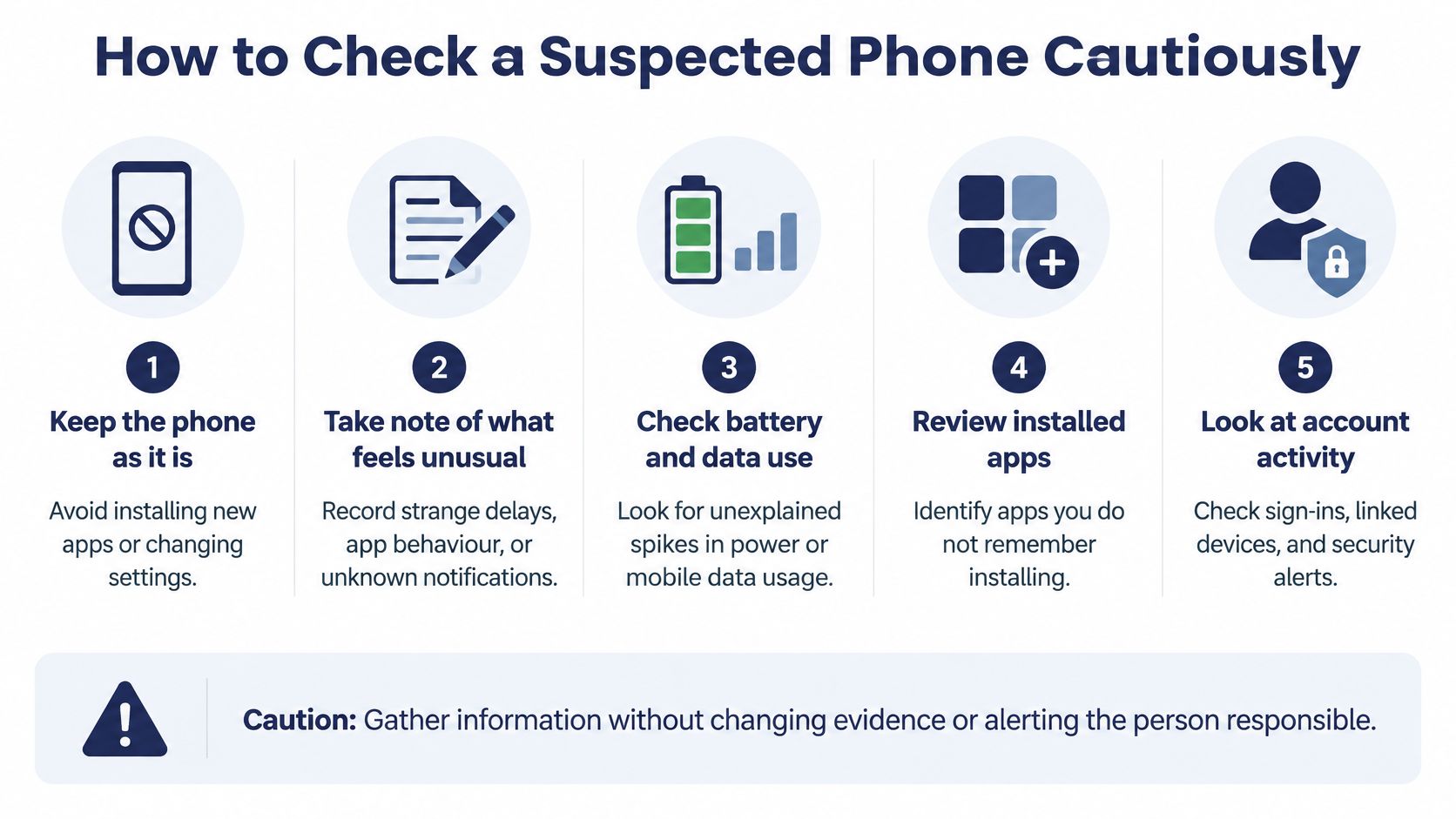
Keep the phone as it is. No new apps, no removal tools, no "cleaner" a friend recommends. Installing anything writes over artefacts an examiner would want, and some monitoring software reacts to removal by wiping its own traces or sending a warning. The common mistake is downloading a scanner onto a suspected phone.
Write down the basics. Model, operating system version, and the date and time of each unusual event. Memory drifts within days, and a dated list turns a vague worry into something testable. The mistake is trusting recall a fortnight later.
Review installed apps and their permissions. Names to watch for include mSpy, FlexiSPY, Cocospy, Spyic, eyeZy, Hoverwatch, iKeyMonitor, TrackView and Cerberus, alongside anything you don't remember installing. Check the device administrator and accessibility lists too, because monitoring tools often sit there. Deleting an app on sight is the mistake, since it may be the only evidence there is.
See which apps hold camera, microphone and location access. A permission granted for a harmless feature can expose the sensor that matters. Assuming a pre-installed app is safe because it arrived with the phone is the usual error.
Look at linked devices and active sessions, on the handset and in the cloud account behind it. A live web session can read messages without any software on the phone at all. Checking only the handset is the mistake.
Note security alerts. Bank, email and cloud sign-in notices you didn't cause deserve a screenshot and a date. Writing off a single alert as an app glitch is how patterns get missed.
A clean result from a consumer security app doesn't prove the phone is safe. Advanced spyware is built to avoid exactly those tools, so an app reporting nothing has told you only that it found nothing it knows how to look for.
If concern remains after those six steps, the next move is a specialist examination rather than a factory reset. A reset feels decisive and ends the enquiry.
Where the worry covers a workplace as well as a handset, Sentry Private Investigators on office bugging covers the room-side questions.
Why Resetting Your Phone Can Destroy Evidence
Most guides for an infected phone end with one instruction: factory reset. It's sound as far as it goes, and it stops short of the part that matters when the phone is also evidence.
The NCSC advises that phones and tablets can't usually be cleaned up with antivirus the way a desktop can, and its stated safest fix for an infected handset is normally a factory reset through the device's settings (NCSC advice on hacked devices). What that advice can't know is your situation. A reset removes application artefacts, account information and logs, the same materials that would show what happened and when.
When a reset costs you something
Where a phone may support a relationship dispute, a workplace investigation, a fraud concern or a legal enquiry, wiping it early can end the case before it starts. Not every suspicion ends in proceedings. The point is that you can't know which way it will go while you're holding the handset, and the reset can wait.
Don't wipe, update or change accounts yet. Updates alter system files and can destroy traces an examination depends on.
Keep the handset powered and somewhere safe. Switching off loses volatile data, and a phone forgotten in a drawer for two weeks loses context.
Record the model and software version. Two lines that let an examiner match findings to the right build.
Preserve the cloud side as well, with a documented chain of custody if the material may be relied on later. Backup data often records more than the handset does.
A phone is evidence before it is a problem to be fixed.
Removing an app or changing passwords without warning can alert the person responsible, and an alerted abuser is a more dangerous one. Timing and personal safety belong in the same conversation as the technical work, not after it.
Clearing the phone afterwards
The reset happens later, once there's a plan. The examiner records findings, the evidence is preserved, and only then is the handset cleared by factory reset or replaced. Two habits matter at that stage: don't restore from a backup that may carry the software straight back, and set the new device up clean rather than from an old image. Change passwords and two-factor methods on a timetable you've thought through, rather than all at once in the first alarmed hour.
A Real Case Where Spyware Changed the Outcome
The client's name stays out of this. She believed her ex-partner was following her and putting her under surveillance, and she couldn't decide whether the phone was part of it or whether she was imagining a pattern that wasn't there. She asked for the phone to be checked rather than wiped.
The examination found spyware installed on the handset and monitoring her messages.
What actually changed
The discovery of the software wasn't the turning point on its own. The documented account was: what had been collected, across what period, and which messages had been read. That turned a suspicion she'd been carrying alone into a finding she could act on. Safety planning, and any later police or legal step, could be built around a record instead of a hunch.
Two things made that outcome possible. The phone hadn't been reset, updated or handed to a repair shop in the meantime. And she had kept notes of when she felt watched, which later lined up with what the examination showed.
Suspicion is a starting point. A documented finding is what changes a plan.
Suspicion on its own isn't enough to act on, and it's corrosive to live with. A finding is different. It can support a safety plan, a report to police or a letter from a solicitor.
Outcomes vary by case. An examination reports what it finds. It won't manufacture a result, and it won't tell you what to do about a relationship.
Where to Turn for Help in Each Situation
The right route depends on what's at risk. Technical checks are one part of it and never the whole.
Situation | First step | Who to contact |
|---|---|---|
Immediate danger | Get to a safe place | Call 999 |
Domestic abuse or stalking | Move somewhere safe and keep a record of incidents | National Domestic Abuse Helpline on 0808 2000 247 |
Non-urgent concern | Record dates, messages and alerts without confronting anyone | Local police on 101 |
Workplace or business concern | Inform internal IT security and HR, and keep the device unchanged | Internal IT team and a forensic specialist |
Legal proceedings expected | Do not reset or update the phone | Solicitor and forensic examiner |
If somebody is at risk of harm right now, the phone can wait. Get to a safe place and call 999.
For domestic abuse or stalking, the National Domestic Abuse Helpline on 0808 2000 247 advises on safety planning and digital evidence, and its staff understand the difference between a controlling partner and a technical fault. This pattern is common: a UCL policy brief on technology-facilitated abuse reports that 32% of people contacting the National Domestic Abuse Helpline encountered at least one form of technology abuse, and that cyberstalking is estimated to affect 1.46% of individuals across England and Wales. The same brief notes that Parliament's Science and Technology Committee has highlighted connected devices such as doorbells, speakers and fitness trackers as tools for stalking, harassment and coercive control.
For a non-urgent concern, report to local police on 101 and keep a running record of dates, messages and alerts. Don't delete anything and don't confront the person you suspect.
At work, tell IT security and HR early, leave the device untouched, and bring in a forensic specialist who can document a chain of custody. If the worry extends past the handset into a meeting room, our UK bug sweeping services cover listening devices and covert cameras alongside the phone.
Where legal proceedings are likely, speak to a solicitor before any device is changed. Evidence rules and disclosure duties vary, and a wipe can be harder to explain than a delay.
Tech abuse rarely travels alone. It usually sits alongside other controlling behaviour: who you message, where you go, who pays for the phone bill. A device check will never prove infidelity or criminality on its own, and anyone who tells you otherwise is overselling.
Protecting Your Phone and Privacy Step by Step
Everything above concerns a phone under suspicion. This part is for a healthy handset, and it applies once the checks or examination are finished, not while evidence is still being preserved.
Prevention lowers the odds of an install and shrinks what any single app can reach. Work through the routine once a month rather than once a year.
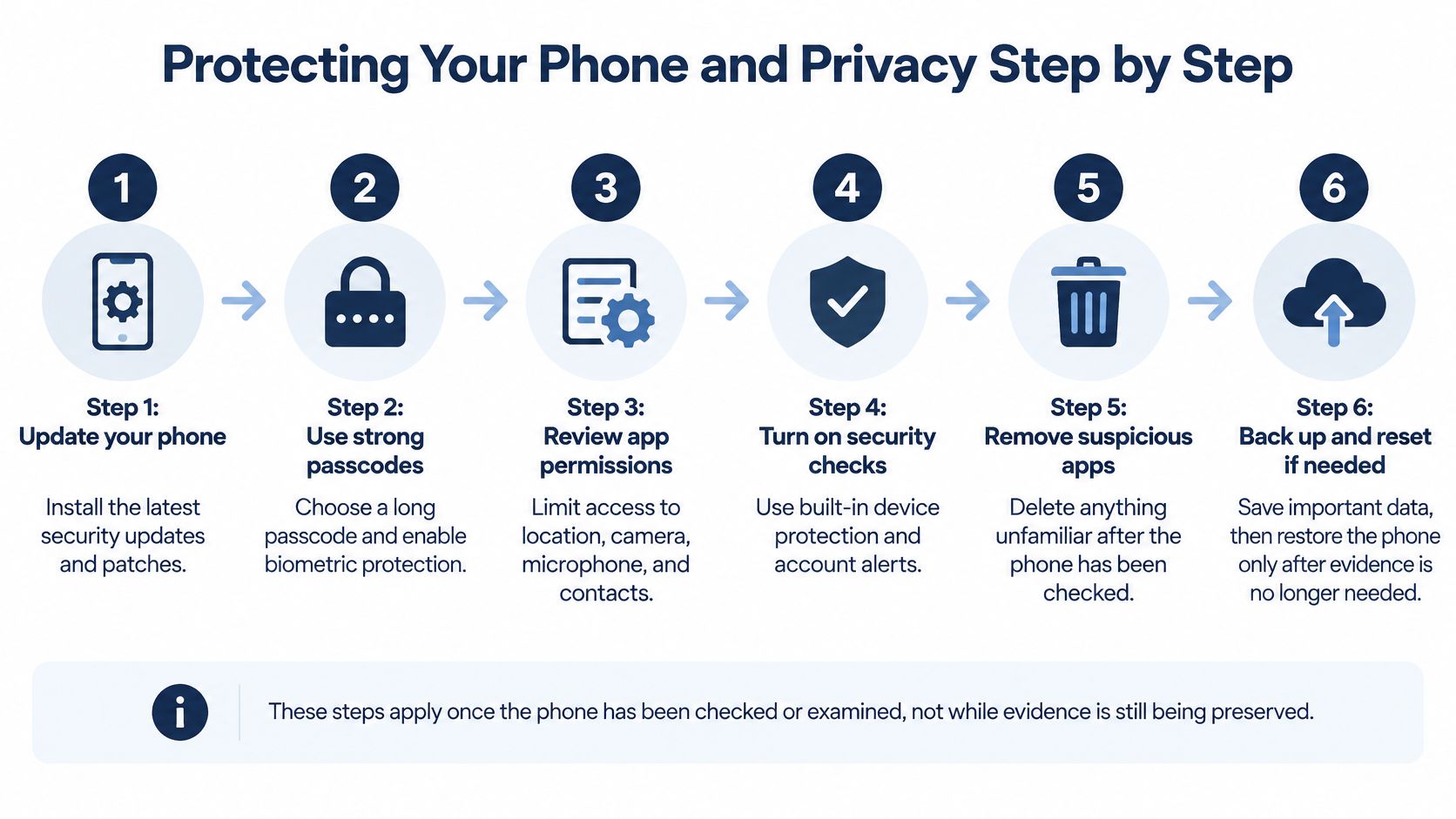
Update the operating system and apps. Patches close the weaknesses commercial spyware exploits. The usual slip is deferring updates for weeks because the phone is "working fine".
Set a strong passcode, six digits or longer, with biometrics only if you're comfortable with who can hold the phone to your face. A passcode a partner or ex already knows, left unchanged, is the slip that matters most.
Don't root an Android phone or jailbreak an iPhone. Both strip away the protections that make remote exploitation hard. Following a forum guide to modify your own phone undoes the security you paid for.
Install apps only from official stores. Sideloaded packages skip the review process entirely. Installing an APK a contact sends "so you can see this video" is how a lot of this begins.
Review permissions monthly, especially camera, microphone, location and contacts, using the six checks set out earlier in this guide.
Turn on two-factor authentication for email, banking and cloud accounts, and remove linked devices you don't recognise. Approving a sign-in prompt that arrives out of nowhere is the mistake to avoid.
The NCSC's mobile-security guidance makes four of those explicit: keep the hardware and operating system mainstream and supported, avoid rooting or jailbreaking, install software only from trusted official stores, and review apps and permissions regularly (NCSC mobile security tips).
Practical rule: prevention is for a phone you trust. On a phone you don't, preservation comes first.
None of this cleans an existing infection. Removing an app before a suspected compromise has been examined destroys evidence, which is why the order matters more than the checklist.
If you'd rather watch than read, this walkthrough covers the same ground in a few minutes.
For the clean-up side, once evidence no longer needs preserving, recover from a malware infection from Nerds 2 You Edmonton walks through removal and recovery in plain steps.
Arrange a Forensic Phone Scan with SPI
When the checks leave you with doubt rather than an answer, a forensic scan replaces guesswork with a record. Sentry Private Investigators Ltd carries out forensic mobile phone scanning on both iPhone and Android handsets, examining the device for signs of monitoring while leaving it in its current state, so findings can be documented and relied on later if they're needed.
Where the concern isn't confined to the handset, the scan folds into a physical TSCM bug sweep. When we attend a home, office or vehicle, the sweep inspects for hidden listening devices, covert cameras, GPS trackers and other technical surveillance threats, and the phone examination runs in the same visit so the device and the surroundings are assessed together. Phones and rooms tend to be part of the same problem, and checking one without the other leaves half the picture.
What to have ready before you call
The phone model, roughly when the concern began, any unusual events you've already noted with dates, and confirmation that the handset will stay untouched until the examination. Those four details shorten the job considerably.
Reports state what the examination found. No ethical examiner promises a particular result, and anyone who does is selling certainty rather than evidence.
Call 0121 769 1626 or 07730 695 853, or email info@sentryprivateinvestigators.co.uk. Quotations are free and without obligation when you call our Birmingham private investigators, and we work with clients across the UK, including London, Manchester, Leicester, Nottingham, Coventry and Wolverhampton.
Sentry Private Investigators Ltd examines iPhone and Android handsets for spyware and monitoring software, and can combine a forensic phone scan with a TSCM bug sweep of your home, office or vehicle in a single visit. If you've noticed something you can't explain and want a documented answer rather than guesswork, keep the phone exactly as it is and get in touch with us. Visit Sentry Private Investigators Ltd to arrange a free, no-obligation quote.
